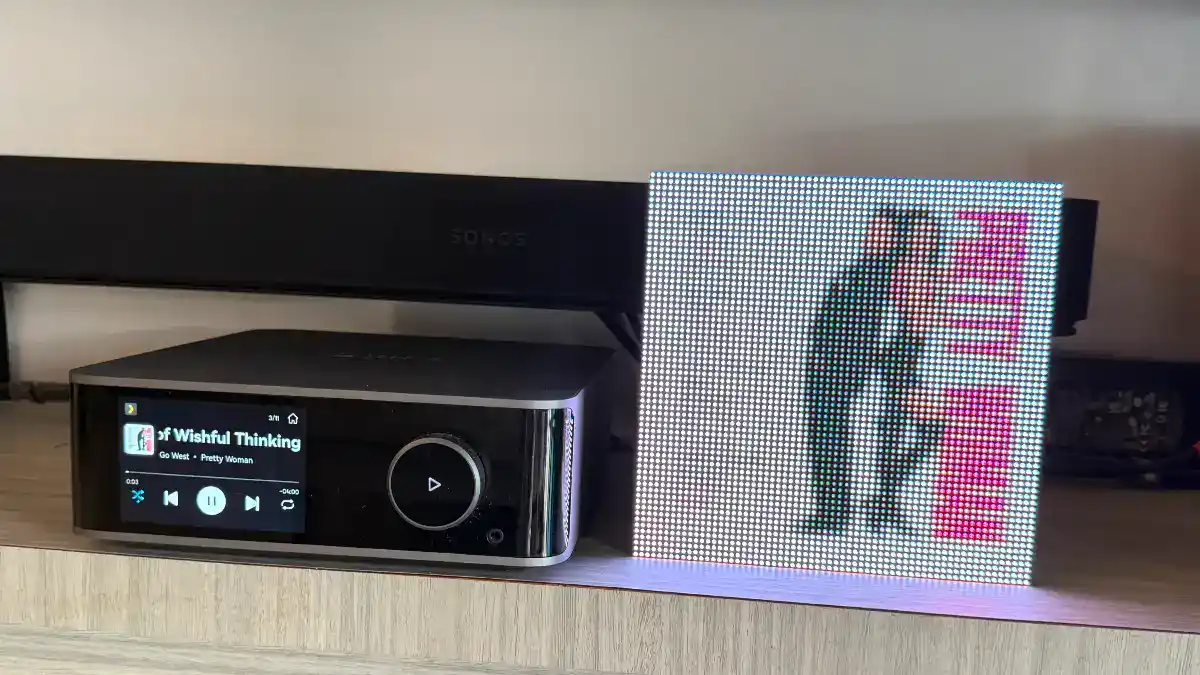
Every now and then I buy a gadget that has absolutely no practical purpose, and I love it anyway. This time it’s the Tuneshine, a little wooden box with a 64×64 LED display that shows the album art of whatever song you’re playing. That’s it. That’s the whole product. This is my hands-on Tuneshine review from Singapore.
Yes, I know. US$200 for a pixelated picture of an album cover. My wallet also asked the same question. The reason I bought it is that I am absolutely obsessed with album art and I even have a Chinese Album Art web site ! I buy gadgets that must be able to display album art covers. And I spent too much time on Mp3Tag 😛
I am a Virgo 😂
After a week with it, here are my thoughts on a product you can certainly live without. But what is life without the fun things we don’t need but want ? 🙂
What is Tuneshine?
Tuneshine is a small, hand-assembled album art display designed by Tobias Butler in Oakland, California, and assembled in the US. It connects to your music account over Wi-Fi and automatically shows the cover art of the track you’re listening to, from any device.
Phone, laptop, smart speaker, whatever.
Quick specs from the official site:
| Specs | |
|---|---|
| Display | 64 x 64 extra-bright LED pixels, with brightness control |
| Size | About 16 x 16 x 4 cm (6.3″ x 6.3″ x 1.57″) |
| Case | Solid wood (Beechwood or Walnut) |
| Price | US$199.99 (Beechwood) / US$219.99 (Walnut), before shipping outside the US |
| Works with | Spotify, Apple Music, Sonos, WiiM, Plex (remote access), Roon, last.fm |
| Also | Shazam via the app (for vinyl, CDs, radio), custom image/GIF/short video when nothing is playing, local HTTP API |
| Power | USB-C cable and 20W power brick included |
| Setup needs | iOS or Android phone plus Wi-Fi |
| Subscription | None required. Optional VIP (US$1/month or US$10/year) for niche features like multiple accounts |
| Speaker? | No. It’s purely a display. |
As there is no shipping to Singapore, I ordered it and sent it to the hotel I was staying at in Seattle. So it was a local order (in USA). The product was well packaged but I will not suggest ordering it to ship to Singapore, what with the LED panel etc.
Unboxing and first impressions

The product comes with the actual unit, a USB-C cable, a USB-C two pin plug… and finally a simple set up card.

The back of the Tuneshine has a small gap for the USB-C input and a small hole for resetting the device with a pin or a pen.

Setting it up
Setup is done with the Tuneshine app (iOS or Android). The flow is basically:
- Plug it in with the included USB-C cable.
- Open the app and connect to the Tuneshine over Bluetooth.
- Give it your Wi-Fi details.
- Log in to your music service(s).
After that you don’t need the app anymore. You just play music like normal.
So I plug in the cable to the back of the device and then to the 2 pin plug and then to the wall socket (with a cheap multi plug) in Singapore. And I took a deep breath and switched it on.
And it worked. Nothing exploded 😊
Here’s the screen….. of Tuneshine waiting for setup…..

So now your job is to download the Tuneshine app on your phone. And you will see the following set up screens…
Step 1 : Launch the app. Click on “Set up Tuneshine”

Step 2 : Scanning for the Tuneshine. Tuneshine needs BLUETOOTH for the connection to set up.


Step 3 : Set up Tuneshine to link to a music source. And then you will need to choose an account to log on to. I will say this step you need to decide carefully.

Note that multiple accounts are ONLY SUPPORTED by VIP subscription which is really cheap anyway at SGD 0.98 per month.

For me, it is simple. I have a WiiM Ultra Music Streamer (and yes it is beautiful with album art). This allows me to connect the Tuneshine to multiple inputs (eg. radio, Spotify, Apple Music, Plexamp etc). So I don’t need multiple accounts set up.
And this is the screen after I connected to the WiiM Ultra.

And then you get the device set up in the app.

Step 4 : Adjust the settings. There are actually not many settings here but there is a brightness setting and animation type etc.

Using it day to day
With the WiiM Ultra, I have a whole set of sources I can play music with. This screen shot just shows some of the sources I have set up but there are many more !

I set off with my default music source, the RADIO. I know.. Uncles love radio and uncles love this radio station 96.3 FM… so here’s how Tuneshine looks…
The pixelation is pretty obvious. This is a 64×64 pixel device. If you are hoping for iPhone or iPad type of resolution of album art, you are going to be disappointed.

And then of course, I play “Pretty Woman” soundtrack album in my Music Library.

Again, you can see it is a lo-fi album art cover displayed….
I switched easily to Spotify and here’s aespa’s “Lemonade” album art cover, which is all YELLOW… if there is an album art cover that should look great, this is it..

Let’s take a photo comparing the WiiM display and the Tuneshine display.

Brightness and where I put it
My listening living room is pretty bright.. so the display (for lack of a better word) is not stunning. Also the photos are an example of how photos look worse than real life. It is one of those times that real life looks better than a photo 🙂
To show the difference between the WiiM screen and the Tuneshine, you can check out these photos…
Jacky Cheung’s album art cover does not look too nice either. I use the Tuneshine at night too, so here is the same cover during the day and at night…….


A Faye Wong album played at night….

Pink Floyd’s Dark Side of the Moon is one of my favourite albums !

But then here’s the key. It is not meant to be a clear display… it is just a device to show off the album art… in a pixelated way 🙃. Not sure if the photos showed it well enough, but the difference between day and night was small in my case. Magnetic Magazine’s reviewer found it popped in a dim studio. It is what it is……
The not-so-great bits
Nothing is perfect, so let me be fair:
- Price. It adds nothing to sound quality. You’re paying purely for the vibe.
- Resolution. If you want a crisp, high-res art display, this is not it.
- One account at a time. Switching between multiple accounts isn’t smooth. The company puts multi-account use behind the optional VIP subscription.
- Fragile panel. The maker notes the LED panel can be fragile around the edges, so don’t knock it. A broken panel can be replaced for a fee.
- Shipping and returns from Singapore. Don’t try. I had mine delivered to my hotel in Seattle and brought it home myself.
I am sure there are other alternatives (e.g. an old iPad, or an old digital photo frame) with some hacking but this Tuneshine is the simplest way to get an album art display vibe in your listening room !
Is the Tuneshine worth it?
Here’s how I’d sum it up… 8/10 if you’re an album art nerd
Get it if you love music, care about the visual side of listening, and like small gadgets that make a room feel a bit more alive. It’s a conversation piece as much as a gadget.
Skip it if you only care about sound quality, or you want a high-resolution display, or US$200+ for a “decoration” makes you wince.
My verdict: Buy it if you are as crazy as I am about album art and want to add some cute stuff to your music listening room. But it is fun !!
FAQ
Does Tuneshine need a subscription? No. Connecting your music accounts is free. There’s an optional VIP subscription (SGD0.98 per month or SGD14.98 per year) for some extra features, such as using multiple accounts.
Which music services work with Tuneshine? Spotify, Apple Music, Sonos, WiiM, Plex (remote access), Roon and last.fm. If your service isn’t listed, last.fm scrobbling may bridge the gap for services like Tidal or Qobuz.
Does it play music or have a speaker? No. It’s only a display. It works alongside your existing speakers.
Does it work in Singapore? Yes, I am in Singapore. HA 🙂
How long do the LEDs last? The maker says the LED panel is rated for 100,000 hours, which is over 11 years of continuous use.
Can it show album art for vinyl or CDs? Yes, through the Shazam feature in the Tuneshine app.
Further reading
Want another opinion? Magnetic Magazine also published a hands-on Tuneshine review from a music producer’s studio.